Showing posts with label Bypassing blocked access. Show all posts

Thursday, February 15, 2007

Bypass firewall restrictions and access blocked sites

0 comments

Well here is another site which helps you in accessing blocked sites

GO to your-freedom.net and download and install their client , it makes your pc an nonymous web proxy and anonymous SOCKS proxy that your applications can use

Just register there and download the client and configure your aplications to to use your own PC as web or SOCKS proxy.


..


Continue Reading...

Friday, February 09, 2007

Breaking firewalls with ssh and putty and getting past blocking restrictions

0 comments

Using Putty on Windows XP


Download Putty


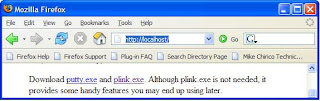
Download putty.exe and plink.exe. Although plink.exe is not needed, it provides some handy features you may end up using later.


Open putty configuration and Enter IP address of your ssh server


Now Create the Tunnel


Your listing should be similar to the following. Make sure each entry has an "L" listed in front of it. Local port 25 will now go to server 192.168.0.5 on port 25. But, ports 110 and 25 will go to server 192.168.0.5.


Now test the connection

If you now open your ssh connection, click on "Sourceforge", or whatever you name it, then, you can browse the data on the "HTTP Server" by filling in local host at the browser. It makes sense to "Check" the connection at this stage -- remember to put in the correct IP addresses for your server.
Setting up Mail client

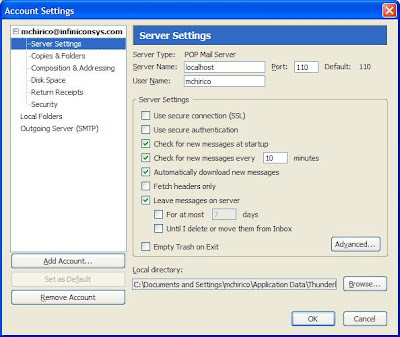
The server location is localhost. And notice the option below to "Leave messages on server". If you have another email client on your workstation at work, then, you might want to keep the mail on the server.


Source and credits
Mike Chirico
http://souptonuts.sourceforge.net/sshtips.htm


.


Continue Reading...

Friday, January 19, 2007

Setting up your own proxy server to bypass firewall restrictions and surf anonymously

2 comments

U searched google and find a web proxy or you are using this for sometime but now they have been blocked by administrator. to get past of it u need to setup your own proxy server , all u need is to find a free web hosting which provides cgi or php support

If u want to setup a cgi proxy than u need to download this cgiproxy script and if u wanna install php proxy than u need to download this phpproxy script or u can download this phpproxy script as well


To setup phpproxy

Download phpproxy and extract it to directory. upload the script to your webpage and open up the new url to check if its working all right. you can also chane the word proxy to avoid filters that ban everything that has the word “proxy” in it.

Setting up cgiproxy

For this all you need is a cgi supported webhosting

Download the cgi script and extract it to a directory.

Open the .cgi file and take a look at the configuration. You can edit lots of settings,

After that upload the script to your cgi directory and open the url from your browser. You are now ready to browse the web,

Alternatively you can use this automatic online installer to install the proxy on the webhost

Enjoy surfing


Continue Reading...

Monday, January 15, 2007

How to access Meebo.com when it is blocked

1 comments

Website Meebo.com is a web based instant messenger site that supports Yahoo Messenger, Msn messenger,GTalk,AIM & ICQ, .

The Meebo team has created a application called Meebo repeater which acts as a proxy and makes it possible again to use Meebo if it is blocked.

Download the Meebo repeater from the Meebo website, and run it. The Meebo repeater will automatically configure the service and tell you the internet address that you will have to use to connect to Meebo. You might have to configure your firewall to allow Meebo repeater access to the net.

It is able to use SSL and standard connections to the Meebo network.


Continue Reading...

Access blocked websites and bypass restrictions

1 comments

You want to open a site which is blocked at ur school or organization and u don't know how to bypass the restrictions ,here is a way

Corel CDN (content distribution network) can be a solution if you can´t open a website because it is blocked by an administrator.


http://coralcdn.org/

Corel CDN caches websites and makes them available even when the website is blocked. To access a website you simply append .nyud.net:8080 to the url.

For example access this blog the url would be

http://www.amitjainonline.blogspot.com.nyud.net:8080/

You can also use firefox plugin for this.

http://coralcdn.org/plugins/

Enjoy surfing


Continue Reading...

Tuesday, January 09, 2007

How To Access Blocked Web Sites

2 comments

So u want to access any site which is blocked in ur office ,here are few tips to bypass firewalls and restrictions and accessing blocked websites


  • Use Google Mobile Search. Google display the normal HTML pages as if you are viewing them on a mobile phone. During the translation, Google removes the javascript content and CSS scripts and breaks a longer page into several smaller pages. like when u access this blog through google mobile it will look like this http://www.google.com/gwt/n?u=amitjainonline.blogspot.com

  • Enter the URL in Google or Yahoo search and then click the cached page. To retrieve the page more quickly from Google's cache, click "Cached Text Only" while the browser is loading the page from cache.See cached version of this blog , click here


  • U can also look for web based proxy sites which are not blocked , they are really good for accessing blocked sites , just google for "web based proxy" and u'll find several proxy web sites

  • Another option is bit complicated, u can use http tunnel to access blocked site for this http://www.http-tunnel.com/html/ Go to this site and download the http-tunnel software


Continue Reading...
 

Amit jain online by amiT jaiN -Internet tips and tricks Orkut tricks , blogger hacks n tricks , windows tricks, and lots of other tips and hacks